Run the shop.
Not the office.
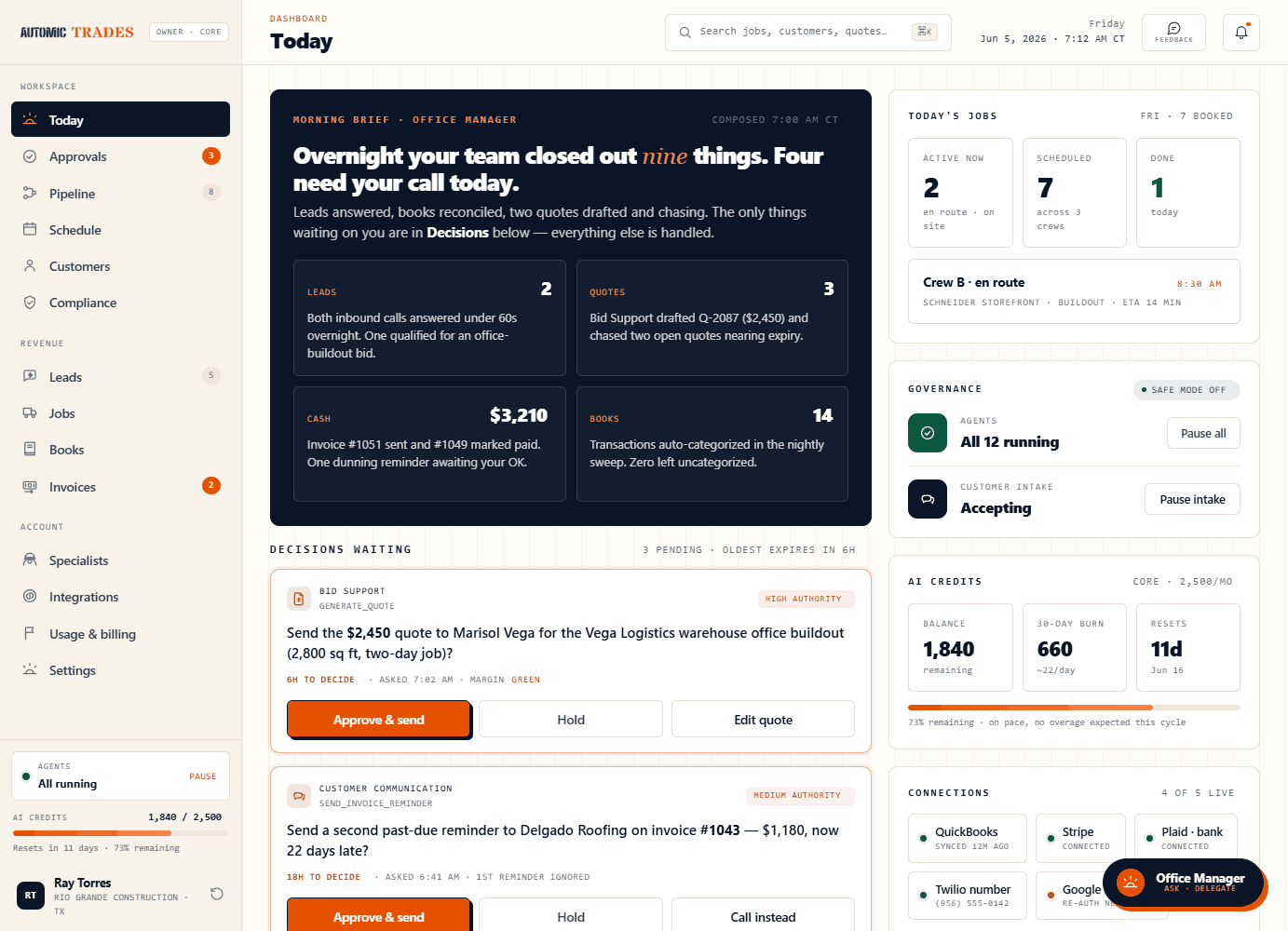
Sign up in five minutes; your specialists start working in ten. By tomorrow morning your first brief lands — leads answered, invoices queued, books categorized, route planned. The back-office work stops stacking on your managers’ desks.
The trade is the trade. The office is where
time and money quietly disappear.
Leads go cold. Invoices age. Reviews don’t get asked. Books fall a quarter behind. The cost shows up in your best people’s evenings and the revenue that never quite lands.
of inbound leads never get a reply on the first day they come in.
the average owner-operator spends on office work instead of the trade.
how far behind the books typically fall before someone catches up.
A team of specialists. One operational office.
Each specialist owns one function and executes real work — then reports up through your Office Manager. You stay in charge; they run the routine.
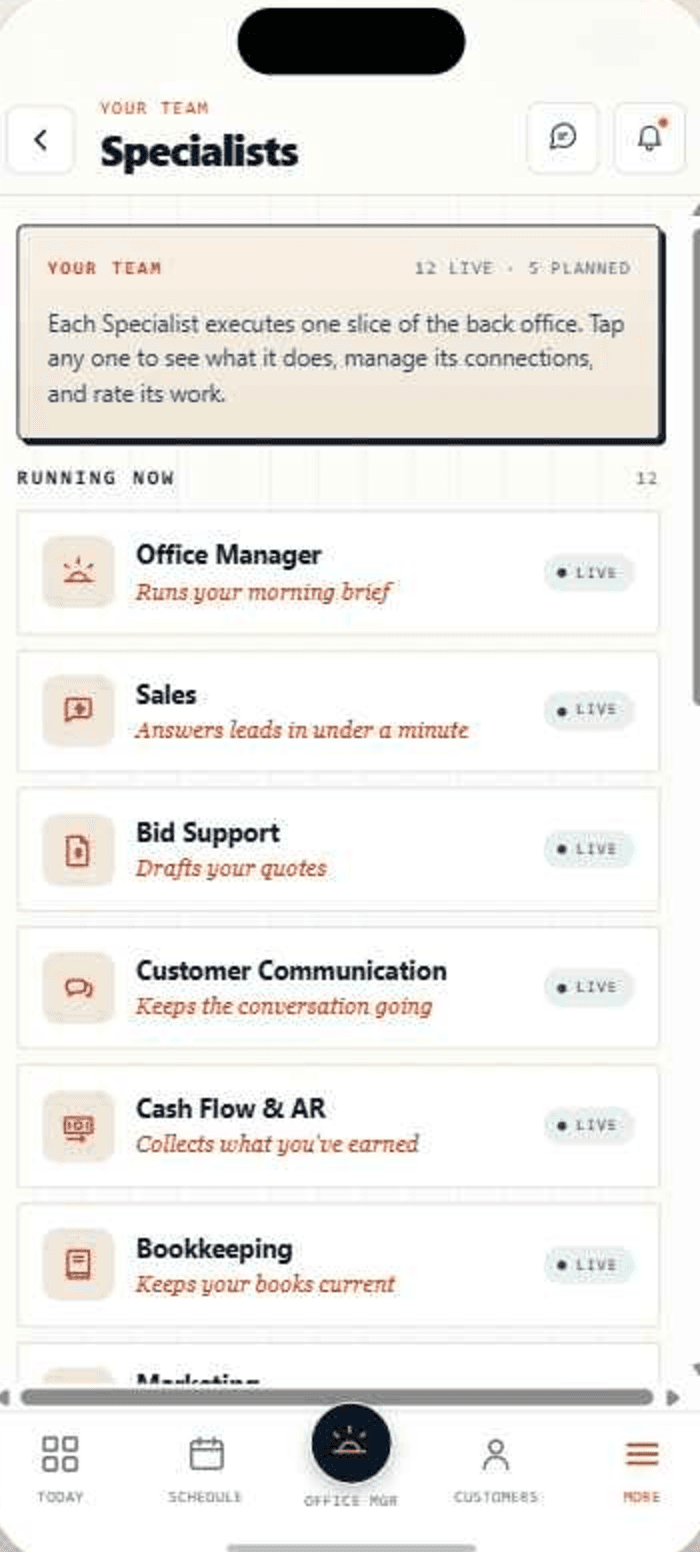
Reads what every specialist saw overnight, sets the day's priorities, and hands you one brief — what closed, what's at risk, what needs a decision before noon.
Your front desk for every inbound. Answers texts, missed calls, web forms, and voicemails in a minute, qualifies the work, and books the appointment into your schedule.
Drafts quotes on your cost baselines, flags any thin-margin job before it leaves the office, and keeps estimating fast and consistent across every manager.
Confirms appointments, follows up on open quotes, chases overdue invoices in your tone, and wins back customers who went quiet — on a schedule, never harassing.
Turns finished work into invoices, keeps receivables visible, and projects cash 30/60/90 days out. It creates and sends — it never moves your money.
Categorizes every transaction nightly, learns your shop's patterns, flags anything odd, and preps the handoff your CPA actually wants. Clean books, clean reports.
Your attribution engine. Stamps each new lead with where it came from and reports weekly which channels turned into booked, paid work — clarity without the agency markup.
Plans and posts weekly content to Facebook and Instagram, and drafts your Google Business updates and review replies in your voice — with owner approval on the first drafts.
Asks happy customers for reviews and re-engages the ones who went quiet — the two moves that compound long-term on every shop.
Keeps the field day moving: reminders before each appointment, an arrival window before you roll up, and every work order and photo in order — synced with your scheduler.
Runs the deadline calendar for everything that lapses — licenses, certs, insurance, permits, 1099s. Surfaces what's due and preps the paperwork; the signature is always yours.
Posts jobs, screens applicants, and hands you ready-to-sign onboarding docs for new hires.
Tracks every vehicle and major piece of equipment — service schedules, registrations, insurance, fuel cards, incidents — and surfaces what to action by when. Advisory by design.
Runs the vendor-to-warehouse loop — stock awareness, reorder triggers, POs, receiving, 3-way match — so parts are on the truck before the crew needs them.
Tracks the building and standing services — lease, utility and alarm accounts, cleaning and maintenance vendors, supplies, signage — and surfaces the right action at the right time.
Runs the post-hire side — onboarding milestones, certifications, time off, reviews, and the sensitive items that carry real legal exposure. Heavily approval-gated by design.
Builds and maintains a professional website from one design form, then keeps it living — new reviews, job photos, changed hours, seasonal campaigns all flow on automatically.
Builds your shop's training program and keeps everyone current — generates trackable training from your own SOPs, curates the outside certs your trade requires (OSHA, EPA 608, manufacturer & safety), assigns them to the right people, and keeps audit-ready records. Works hand-in-hand with Compliance.
Why are the specialists numbered?
The numbers are stable registry slots — not a live count. Each specialist keeps the same number for good, so #01–#19 is a fixed roster you can refer to, whether a slot is Active today or Coming soon on the roadmap.
One gap is intentional: #18 is reserved for the Automic Trade Network — a shop-to-shop teaming layer, not a back-office specialist — so it sits in the registry without appearing in this grid. That’s why the run reads …#17, #19 and not a skipped number.
Specialists ask first.
You approve.
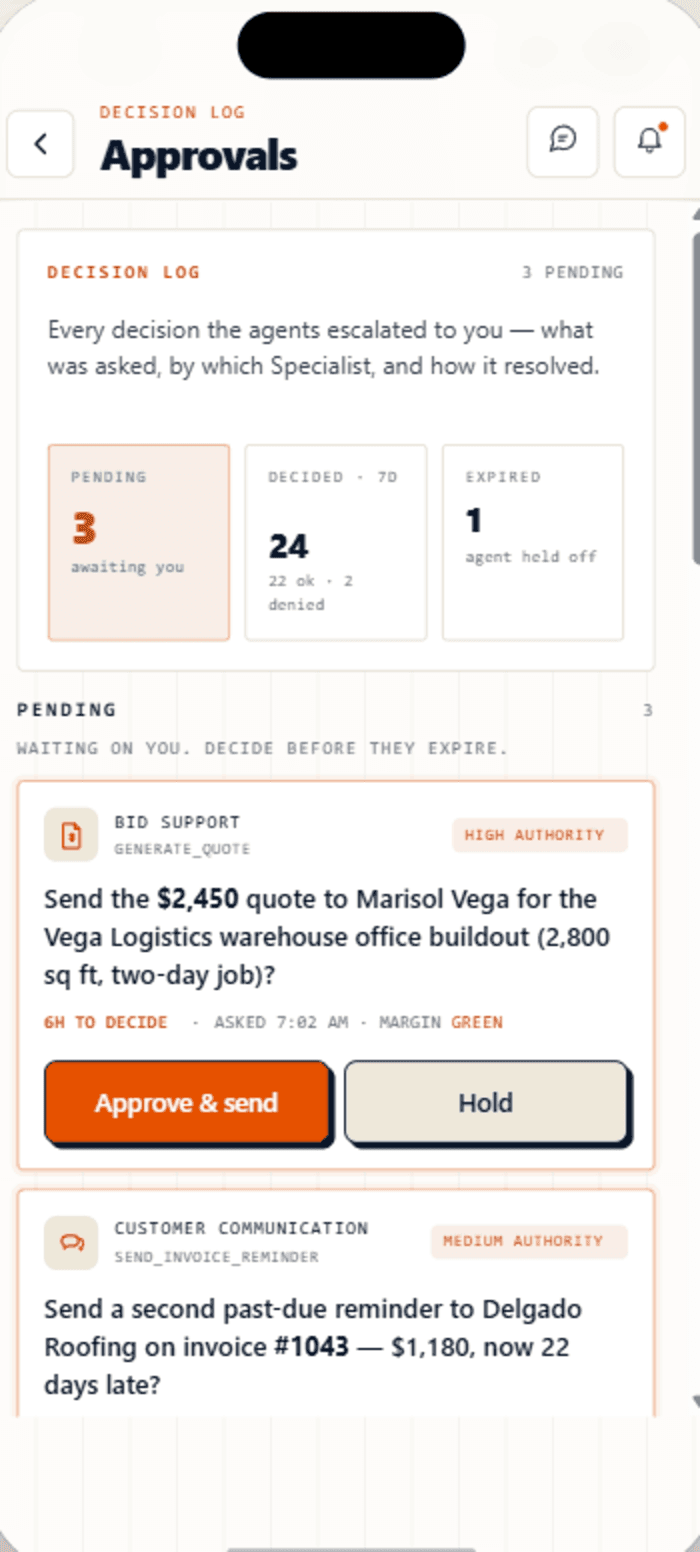
Anything big — payouts, refunds, hiring, contracts, schedule changes — pauses for your tap. Routine flows. You see what they were going to do, what it costs, and whether to greenlight or rewrite the plan.
Open it on your phone in the truck or the desktop at the office. Same brief, same actions, same approvals — your day on whichever screen you’re on.
Put AT around IT.
An operational layer that connects the software your shop already runs — books, payments, calls, calendars, social — and adds a team of specialists that work across them. The list grows; your stack doesn’t have to.
Connected day one
On the roadmap
Shops still running the schedule on a whiteboard or group text get a clean built-in jobs layer — schedule, crew assignment, status, photos. Graduate to Jobber or Housecall Pro whenever you’re ready. Works without QuickBooks on Core, works better with it when you add it.
One monthly rate. Three tiers to fit the shop.
Pick the tier that fits your shop and your specialists clock in the same day. Cancel anytime; your data sits with you for 30 days if you come back. Flat and locked through 2027.
- 12 Specialists
- 12 free crew seats
- Native invoices + CSV export
- Adds QuickBooks write-back
- 15 free crew seats
- Payroll + timesheets (coming soon)
- Adds Logistics + field app
- 30 free crew seats
- Priority AI + 99.9% SLA
Core & Plus start at 1 (cap 6); Pro at 5 (cap 24). Extra paid seats are a flat $50/mo each.
A stripped-down phone app at /crew — one-tap status, photos, notes. Free up to 12 (Core), 15 (Plus), 30 (Pro).
Multi-branch operations or groups combining the agent team across several tools at volume pricing.
Talk to us →Refer a trade business to Automic Trades. When they become a paying customer, you each earn a $100 bonus — no cap on how many shops you bring in.
The Automic Trade Network
An internal network of teaming and support that ties the independent shops on Automic Trades into one operational fabric — so the next job, the next subcontractor, the next backstop is already a trusted peer in the same ecosystem.
When a job is too big or out of area, route it to a vetted shop in the network.
Coverage when you are slammed, short-handed, or off the clock.
Bring in specialty trades from inside the same operational standard.
Every shop on the network runs the same office discipline you do.
Questions worth asking before
you hand over the office.
Pick the tier that fits your shop at signup and your specialists clock in the same day — running on your data, working the back office. One flat monthly rate per tier; cancel from the billing page anytime, and your data sits with you for 30 days if you come back.
One flat monthly rate per tier — Core $499, Plus $799, Pro $999 — billed monthly. Pricing is locked: no intro step-ups, no surprise increases. Cancel from the billing page anytime.
Your flat rate includes a generous monthly pool of work — every lead your team answers, every quote it drafts, every review it chases, every invoice it sends. Most shops never come close. On Core that pool is enough for hundreds of lead replies a month plus the day-to-day quotes, invoices, and briefs. If a busy month does run the pool down, you pick what happens: pause the routine work until the next cycle (the default — urgent live jobs always keep running), top up automatically with a small refill so nothing stops, or keep going and settle the extra on your next bill with a ceiling you set. You see exactly where the work went on the billing page, and you are always in control.
Yes. Any active paying customer who refers a new shop earns $100 when that shop pays their first invoice — paid by bank transfer 45 days later as a thank you. The referred shop gets $100 in AT Credits on that same first invoice, as a thank you for trying us out. One program, both sides benefit. The referred shop must be new to Automic Trades or returning after at least 90 days away. Referrer eligibility conditions apply — see program terms.*
Crew seats are for field crew — installers, drivers, paint techs — who only need to see their assigned work. They get a free phone-only app at /crew with one-tap status, photo upload, and notes. Core includes 12 free crew seats; Plus 15; Pro 30. Office and manager users are paid seats; field crew are not.
Paid seats are for owners, managers, and shift-leads — they get full access to dispatch, customers, invoices, books, and everything else. Crew seats are for field crew who only see the jobs assigned to them and the crew app at /crew. Different roles, different access, different prices — paid seats $50/mo each (over the included count), crew seats free up to your tier cap.
If you are on Jobber, your crews already have the Jobber field app — crew seats are not required. The free crew seats are for shops without Jobber who still want field-side workflow (status, photos, notes) without paying per crew member. Use whichever fits your shop.
No customer-facing post goes live without owner approval for the first three drafts. Every SMS the specialists send is previewable. Tone adapts to how your managers already write.
One button stops all operations. You can bring systems back online one at a time or all together. You are in total control.
No. Automic Trades runs in parallel. Keep whatever field-service tool your crews use; the specialists handle the office layer on top of it.
Direct integrations are on the roadmap — Jobber first (jobs, customers, invoices, and schedule kept in sync), with Housecall Pro, ServiceTitan, and Workiz to follow. They are coming soon, not live yet. Until each one lands, Automic Trades works in parallel with the tool you have — no forced migration.
Automic Trades ships with a clean built-in jobs layer — schedule, crew assignment, status, photos, notes. It works without QuickBooks (native invoices + CSV export) and gets even better when you connect QuickBooks — which you can do on any tier. The built-in jobs layer is there if you need it; you can graduate to Jobber anytime.
If you run an independent shop in a service trade, the specialists work. The baselines step tailors pricing to your vertical; the specialists pick it up from there.
Paid seats — for owners, managers, shift-leads — start at 1 on Core (cap 6) and Plus (cap 12), and 5 on Pro (cap 24). Extra paid seats are $50/month each. Crew seats — free, for field crew using the /crew phone app — go up to 12 (Core), 15 (Plus), 30 (Pro). Enterprise plans with volume pricing are available on request.
No. Every tier works without it — invoices go through Stripe and you get a clean CSV export for your accountant. And you can connect QuickBooks on any tier, Core included — when you do, the Bookkeeping specialist sets your books up automatically. You pay Intuit directly for the QuickBooks subscription.
Yes — on every tier. Connect QuickBooks and the Bookkeeping specialist seeds your chart of accounts, pulls the last 90 days of transactions, and categorizes them automatically. On Pro you also get concierge done-for-you onboarding — we handle the whole setup and hand you your first month’s P&L within 48 hours.
Any direction, any time. We prorate the difference via Stripe. Upgrade mid-month and you’re billed the prorated diff immediately; downgrade and the balance applies to your next invoice.
Cancel anytime. Your data sits with you for 30 days if you come back; hard-deleted after that. Export available on request.
Your managers came in for the trade.
Give them their evenings back.
Get started. Your first morning brief lands tomorrow.